One App, Many Configurations: Organize Servers and Tweaks in HTTP Tweak
HTTP Tweak keeps multiple configurations separate, with each configuration holding its own server and tweak lists - a clearer way to manage different connection setups in one app.
Most connection apps are easiest to understand when you only have one setup. The practical problem starts when you need several: a personal profile, a customer profile, a test setup, a backup route, or different tunnel families. A single unstructured list of endpoints and settings quickly becomes difficult to review safely.
HTTP Tweak is designed to keep that work organized. You can create multiple configurations, and each configuration keeps its own collection of servers and tweaks. Instead of putting every option into one long list, you can group the resources that belong together, switch to the configuration you need, and maintain each setup independently.
This is especially useful for people who manage more than one authorized connection workflow. It is not a remote-account generator: your SSH, VPN, proxy, V2Ray, DNSTT, or Hysteria service still needs to come from your own infrastructure or an authorized provider. HTTP Tweak helps you arrange and use the connection details you are allowed to manage.
The three layers of an HTTP Tweak setup
The app separates a working setup into three useful layers:
| Layer | What it contains | Why it matters |
|---|---|---|
| Configuration | A named, independent profile | Keeps one purpose, customer group, region, or revision separate from another |
| Tweak | The tunnel method and its transport settings | Defines how the client should make the connection |
| Server | An endpoint, account details, or a compatible profile | Supplies the remote destination used with the chosen tweak |
A configuration is the container. The server and tweak lists belong to that particular container, not to every configuration in the app. That means a change made while working in one configuration does not turn an unrelated configuration into a mixed collection of endpoints and transports.
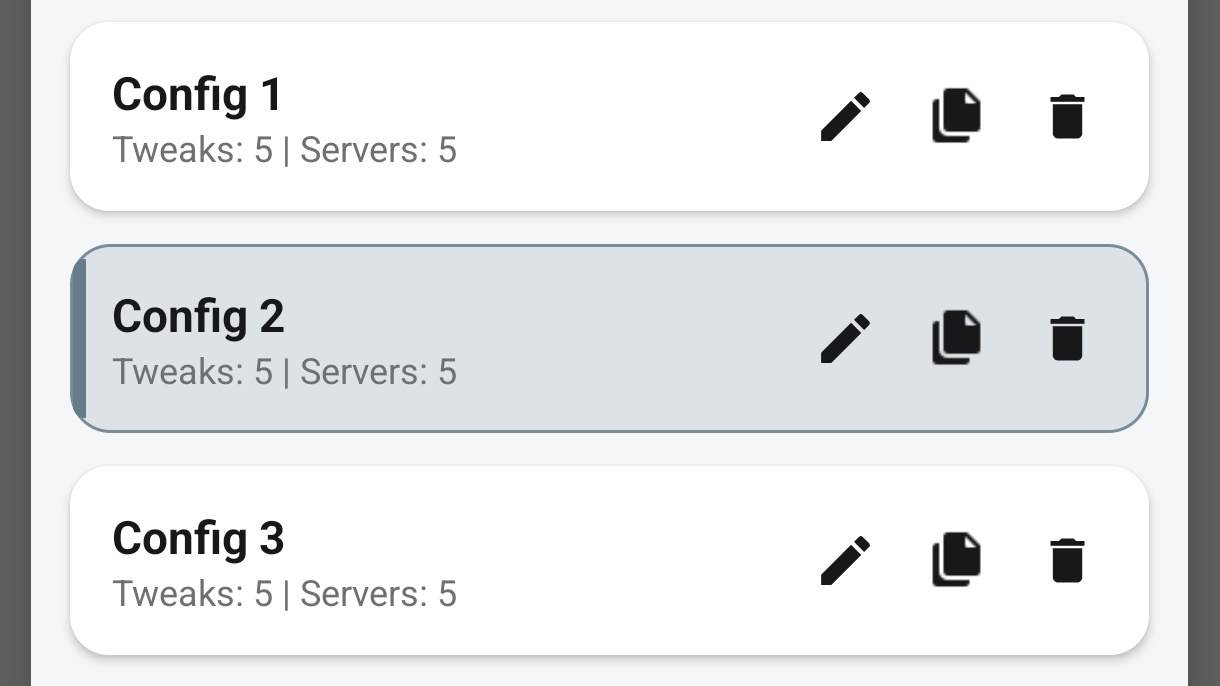
The screenshots below show the structure in use: three saved configurations are visible, and the selected Config 2 reports five tweaks and five servers. Its own resource lists can then be searched, copied, edited, or removed without opening another configuration.
Create configurations for separate purposes
Open the configuration selector to see your saved profiles. In this example, Config 1, Config 2, and Config 3 are separate entries. The selected configuration is clear, and every entry shows its current tweak and server counts at a glance.
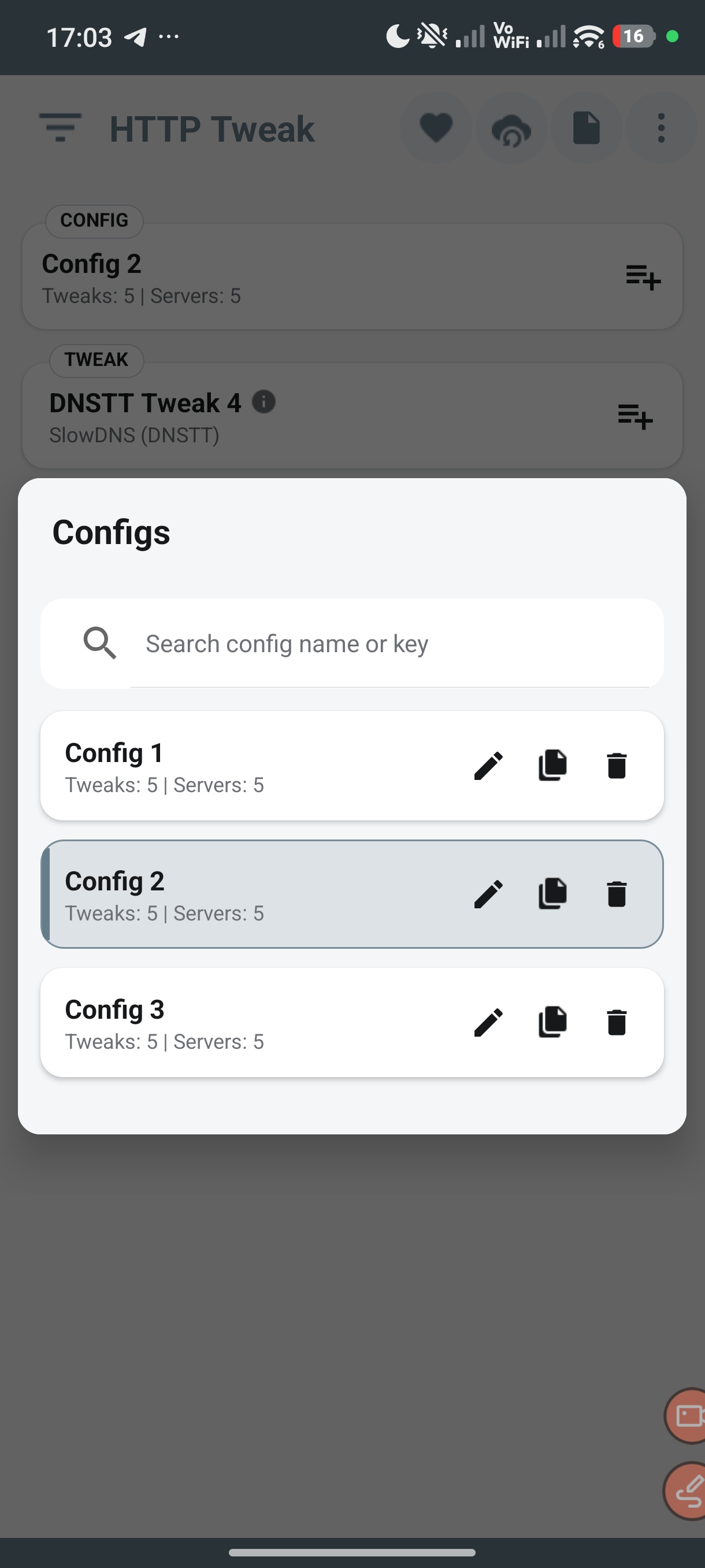
This is more maintainable than treating a single configuration as a catch-all. Use clear names that describe the reason the configuration exists, for example:
Personal SSH - PrimaryCustomer Group A - JulyVLESS Test - BackupDNSTT Lab - Do Not Share
Avoid storing secrets in the name. A good name should help you choose the correct profile without exposing a username, password, private key, UUID, or private host.
The configuration list also provides search and per-item edit, copy, and delete actions. Copying a configuration is useful when you need a controlled starting point for a new revision. Rename the copy immediately, then make the intended changes there rather than changing a working profile that other people still rely on.
Keep several tweaks inside the configuration that uses them
A tweak describes the connection method and transport behavior. The selected Config 2 in the example includes five different tweaks: DNSTT, Hysteria, OpenVPN over HTTP Proxy, SSH over HTTP Proxy, and V2Ray. The list keeps each item named and identified by its tunnel type.
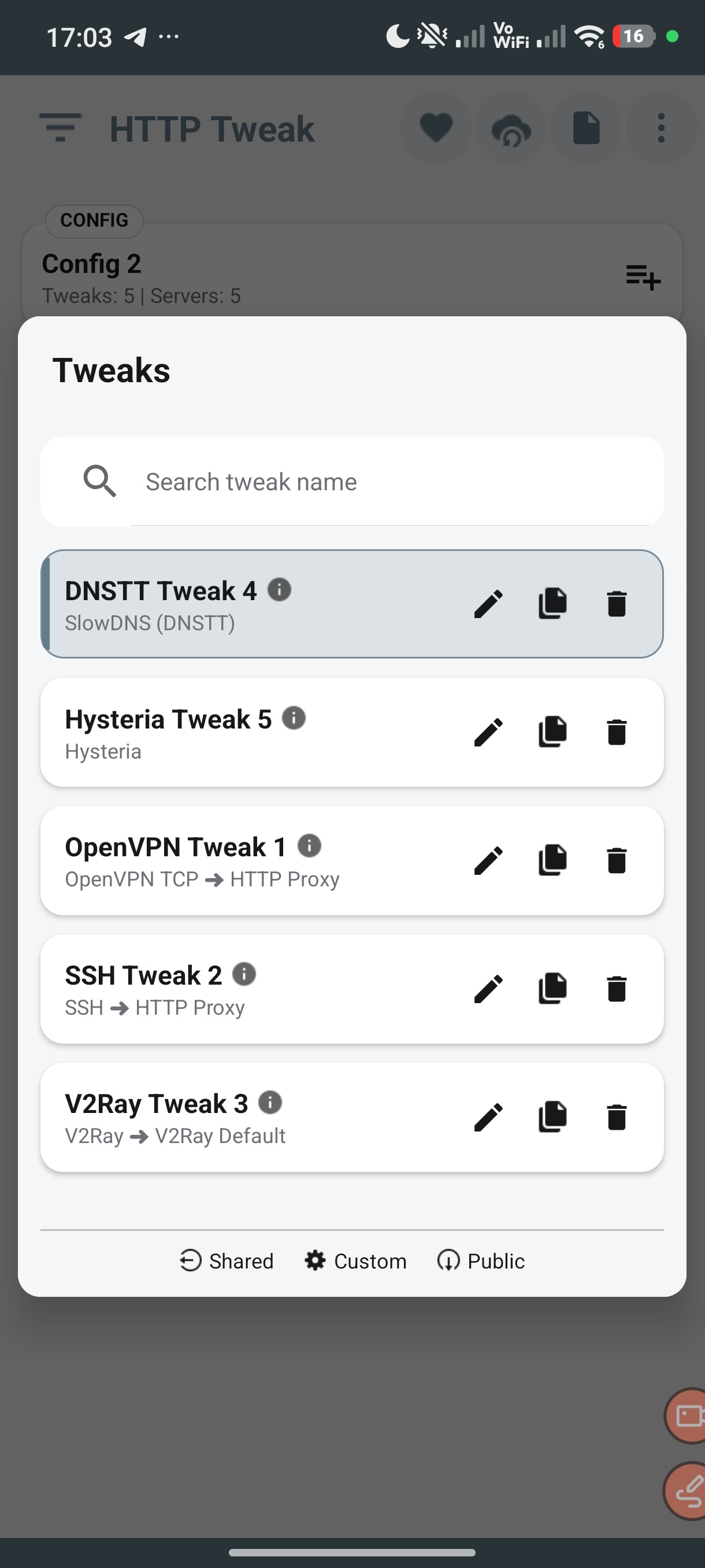
This lets one configuration hold more than one planned connection method when those methods serve the same operational purpose. For example, an operator may keep a primary SSH route and a tested V2Ray fallback in one customer configuration, while keeping experimental transports in a separate test configuration.
Use the list deliberately:
- Create or select the configuration for the purpose you are managing.
- Add a tweak with a recognizable name and the correct tunnel family.
- Save only the transport values supplied for that authorized setup.
- Use a category when you want matching servers and tweaks to be grouped together.
- Copy a working tweak before testing a material change, then label the copy as a new revision.
Tunnel type and category still matter. A V2Ray server will not be a compatible match for an SSH tweak, and category-based organization only works when the intended server and tweak use the same category. The app can help narrow the choices; it cannot make mismatched or invalid remote details connect.
Add multiple servers without mixing every endpoint together
The Servers screen for Config 2 shows the same idea on the endpoint side: an auto-select option and five named servers, including DNSTT, Hysteria, OpenVPN, SSH, and V2Ray entries. Each server stays inside the selected configuration and can be searched or maintained individually.
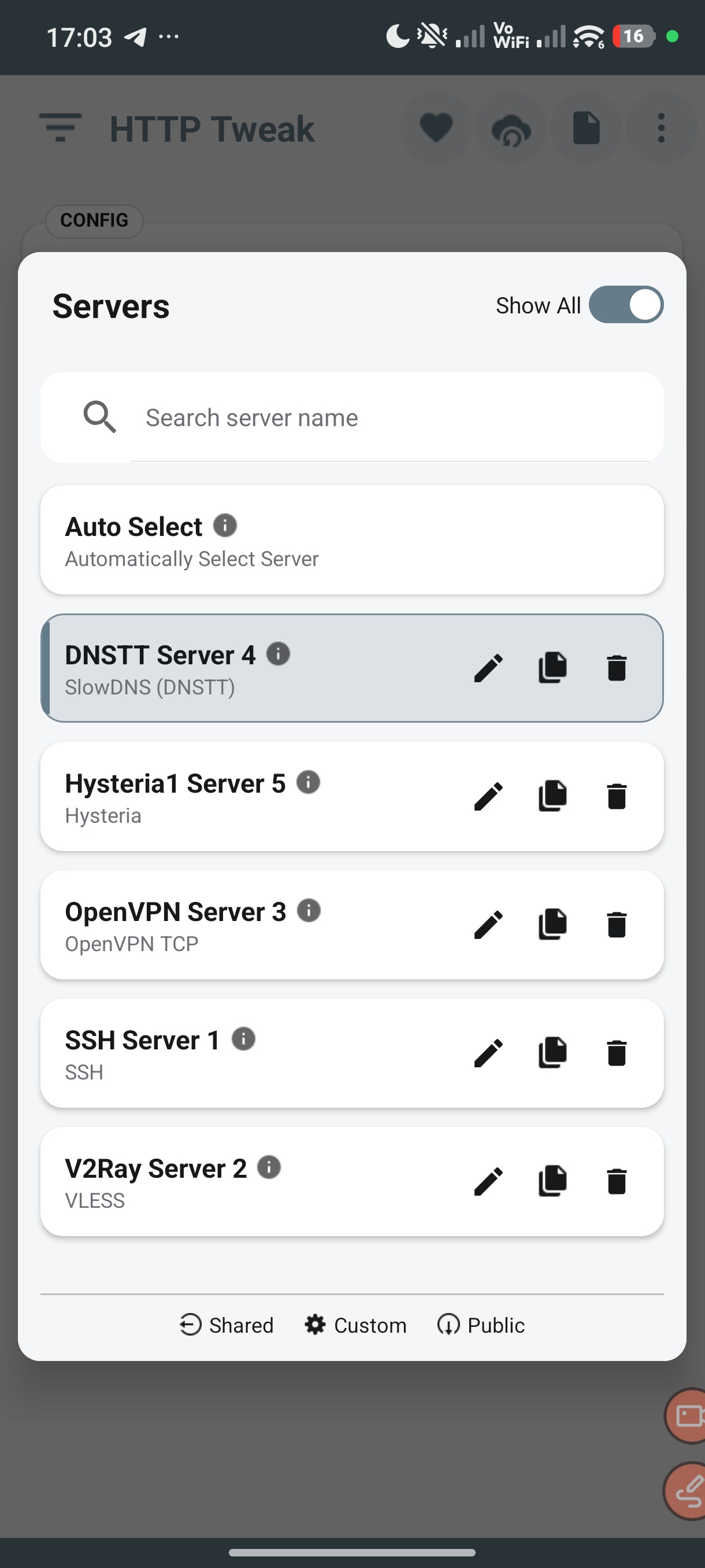
Give servers names that explain their role without revealing credentials, such as SG SSH 01, VLESS Backup, or OpenVPN TCP - Primary. If the app supports multiple sources in your workflow, use the resource filter deliberately so you know whether you are working with your custom items or a shared/public resource.
When you add or edit a server, verify all of the following before you rely on it:
- the server tunnel family matches the tweak you intend to use;
- the endpoint, port, account, profile, and transport values came from an authorized source;
- the category matches when you use category filtering;
- the server name identifies its purpose and revision;
- no private credential has been copied into a public note, screenshot, or support message.
Multiple saved servers provide organization and choice. They are not a guarantee of automatic failover, account availability, or connection success. Test each intended server-and-tweak combination with the provider or infrastructure you are authorized to use.
Why multiple configurations matter
The benefit is not merely a larger list. It is separation of responsibility.
| When everything lives in one profile | When configurations are separated |
|---|---|
| Test items can be confused with working customer or personal items | Test, personal, customer, and backup setups can have clear boundaries |
| A server list becomes harder to scan as tunnel types grow | Each configuration presents only the resources relevant to its purpose |
| Editing a transport may risk an unrelated setup | You can copy and change a specific configuration revision |
| A person receiving a configuration may see more resources than they need | You can prepare a focused configuration with only its intended servers and tweaks |
For anyone who has only used a simple, single-profile VPN app, this structure changes the workflow: the app becomes a catalog of focused connection profiles instead of one crowded screen. It is particularly helpful when you move between different tunnel families, maintain separate customers or teams, or keep stable and experimental work apart.
A practical way to organize your catalog
Start small and use a repeatable naming rule. Here is an example structure:
| Configuration | Intended use | Tweaks inside it | Servers inside it |
|---|---|---|---|
Personal - Stable |
Your tested daily setup | SSH TLS Primary, VLESS Backup |
SG SSH 01, SG VLESS 01 |
Team A - July |
A controlled team or customer revision | Only the approved tunnel methods | Only the endpoints authorized for that revision |
Lab - Testing |
New transports and experiments | Clearly named test tweaks | Disposable or authorized test servers |
Keep the production-style configurations clean. When a tweak or server requires a major change, copy the relevant item or configuration, rename it with a revision, test it, and only then replace the older working choice. This makes it easier to roll back and easier to explain which setup someone should use.
Recommended workflow
- Create a configuration for one clear purpose.
- Add the compatible tweaks that belong to that purpose.
- Add the compatible servers and use matching categories where appropriate.
- Test the intended combinations with authorized accounts and endpoints.
- Copy before major changes so a known-good setup remains available.
- Keep names meaningful and remove obsolete test items when they are no longer needed.
- Export or share only the focused configuration that the recipient is authorized to receive.
If you later deliver a configuration to another person, apply the appropriate export and access controls for that workflow. A well-organized configuration is easier to secure because you are not accidentally sharing unrelated servers, tweaks, or older experiments alongside it.
Frequently asked questions
Can I create more than one configuration in HTTP Tweak?
Yes. The configuration selector is built for multiple saved configurations. Each one has its own name and its own saved server and tweak collections, so you can keep separate workflows in the same app.
Can one configuration contain several server types and several tweaks?
Yes. The example above shows one configuration containing DNSTT, Hysteria, OpenVPN, SSH, and V2Ray resources. Use compatible tunnel families and matching categories when you expect a particular server to appear for a particular tweak.
Does creating several configurations create VPN or SSH accounts?
No. Configurations organize client-side connection settings. Remote accounts, subscriptions, credentials, endpoints, and service policies still come from your own infrastructure or an authorized provider.
Should I put every server in every configuration?
Usually no. Keep each configuration focused on its purpose. A smaller, organized list is easier to test, easier to support, and less likely to expose an unrelated resource when you export or share the configuration.
Can I safely test a change without breaking a working setup?
Copy the relevant configuration or resource first, rename the copy, and test there. This preserves a recognizable working version while you evaluate the change.