Cloud Protect for HTTP Tweak Configs: Secure Exports and Sharing
Cloud Protect helps keep exported HTTP Tweak configurations private when you copy, save, or share them. Learn when to use it and how to turn it on.
An HTTP Tweak configuration can contain the connection choices you have set up: servers, profiles, access rules, and other settings. If you copy or send that configuration without protection, the person who receives it may be able to pass the same copy to someone else.
Cloud Protect gives you a safer way to share a configuration. It keeps the shared copy protected and lets the HTTP Tweak app check with the cloud before it opens the configuration. You can still copy it, save it as a file, or send it through the cloud - but a copied protected configuration is not meant to be opened like a normal, unprotected one.
Cloud Protect is useful for owners, providers, teams, and resellers who want to share a configuration with the intended user without making it casually reusable when it is forwarded.
What Cloud Protect does
When you turn on Require Cloud Protection, HTTP Tweak protects the exported configuration and uses the cloud to open it in the app. The app also performs an extra safety check before the protected configuration is opened.
In simple terms:
- You choose Cloud Protect while exporting your configuration.
- You share the protected copy by clipboard, file, or cloud.
- The recipient opens it in the HTTP Tweak app while connected to the internet.
- The app checks the protected copy with the cloud before opening the configuration.
| Normal export | Cloud Protect export | |
|---|---|---|
| If it is copied | The copy can be opened like a normal configuration | The copy still needs the protected app-and-cloud check before it opens |
| Internet | A saved file can be used offline | Internet is needed when creating and opening the protected copy |
| Best for | Personal testing or a backup you want to restore offline | Customer delivery, team sharing, or a configuration that should not be freely passed around |
Cloud Protect is an extra layer, not a magic lock. Someone who is allowed to open a configuration can still use it in the HTTP Tweak app. It helps reduce the risk of a copied export being useful by itself.
Why people use Cloud Protect
It makes accidental forwarding less useful
Messages, files, and copied text are easy to forward by mistake. With Cloud Protect turned on, the copied configuration cannot simply be opened as a normal export. The app must check it through the protected cloud flow first.
It keeps sharing simple
You do not need a different process for every delivery method. Cloud Protect works when you copy the configuration, save it to a file, or use the cloud option. Choose the method that is easiest for the intended recipient, then send it through a private channel.
It adds an app check before opening
Before a protected configuration is opened, the app makes an extra safety check with the cloud. This helps ensure that the configuration is being opened through the expected HTTP Tweak flow, rather than treating a copied value as an ordinary file.
It helps keep each delivery focused
If you manage configurations for customers, resellers, or a team, you can prepare one clean configuration for each purpose. Cloud Protect helps you share that intended package without making it a casual public download.
How to export a Cloud Protect configuration
Use these steps with a configuration that already works for the people you intend to support. Do not use screenshots or public examples as a source of real account details.
1. Open the export menu
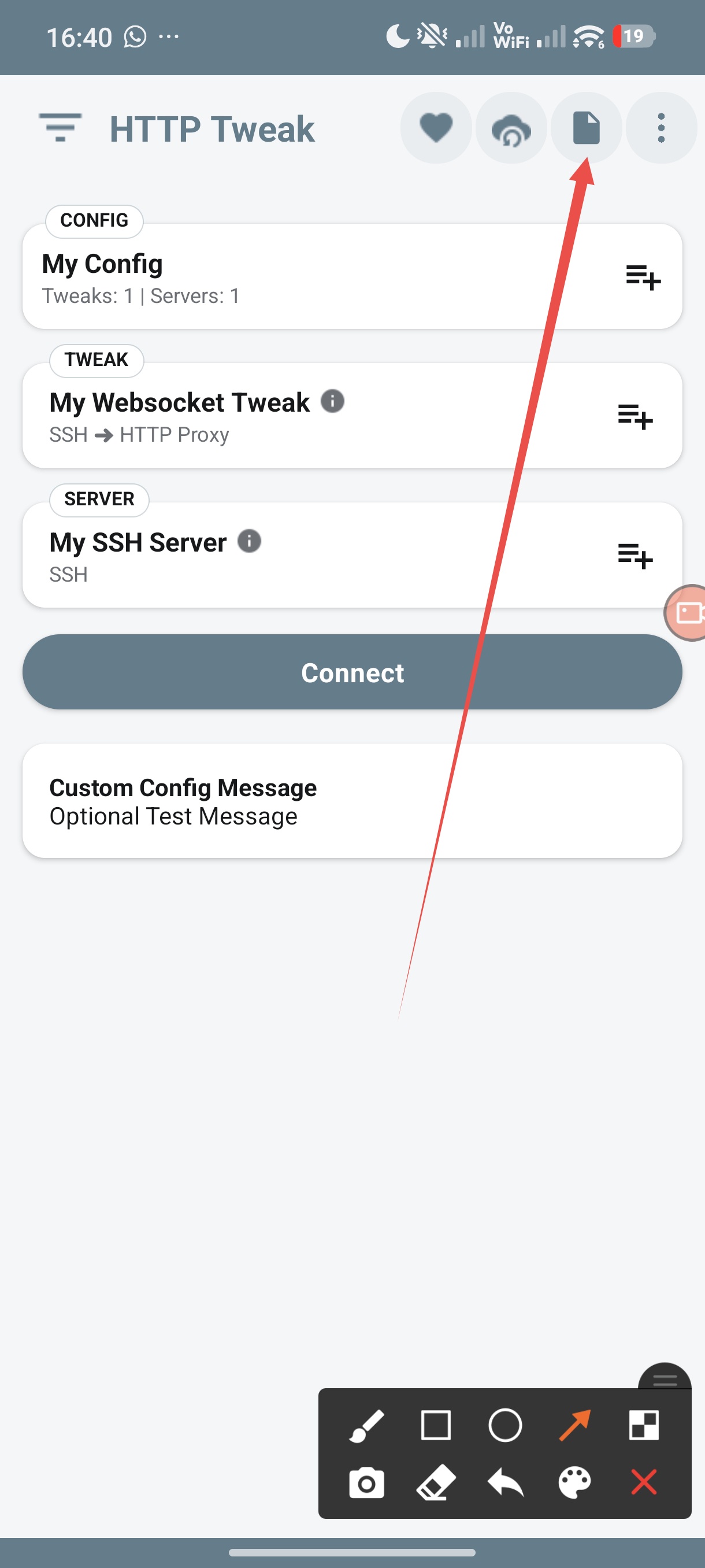
On the configuration screen, tap the document icon in the top action row.
2. Choose Export Config
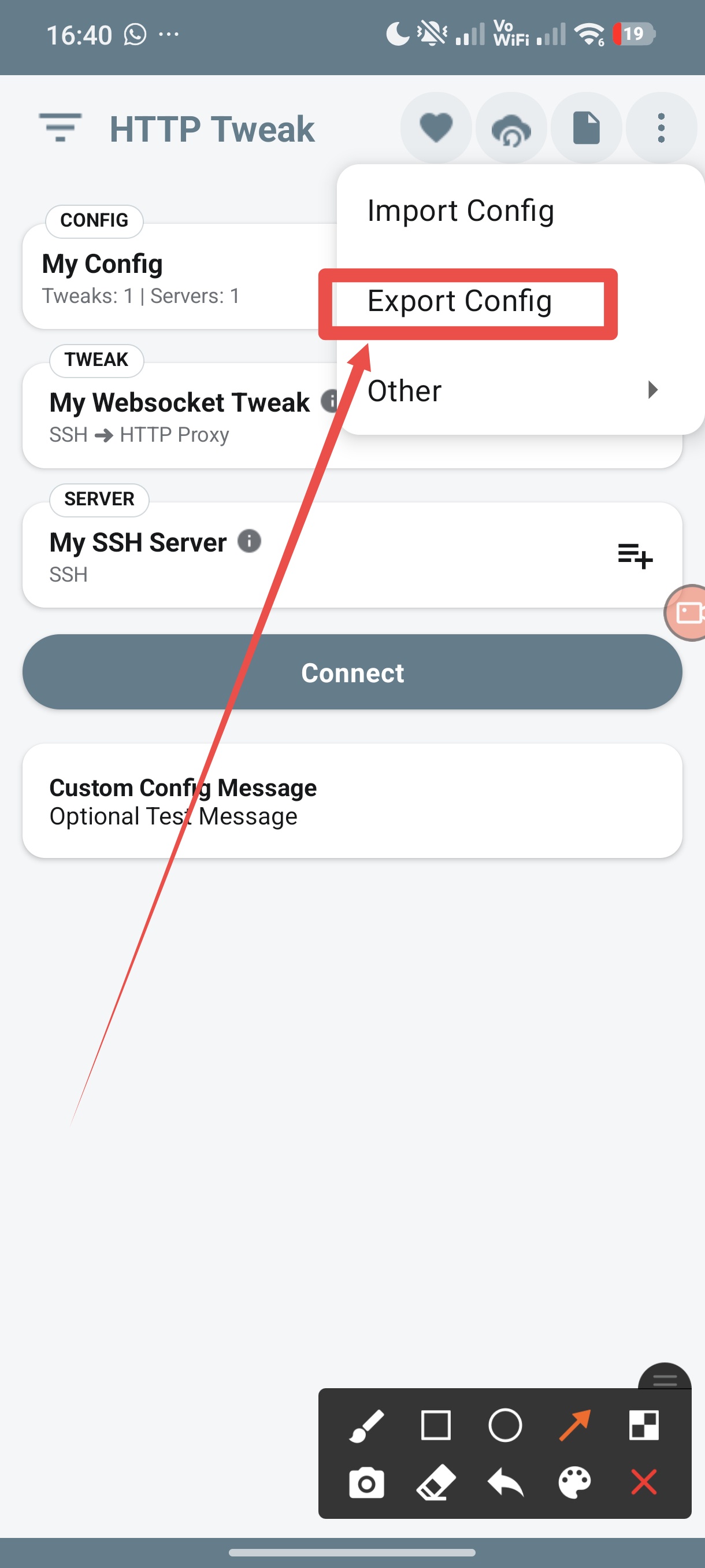
Select Export Config from the menu.
3. Review the options that matter to your users
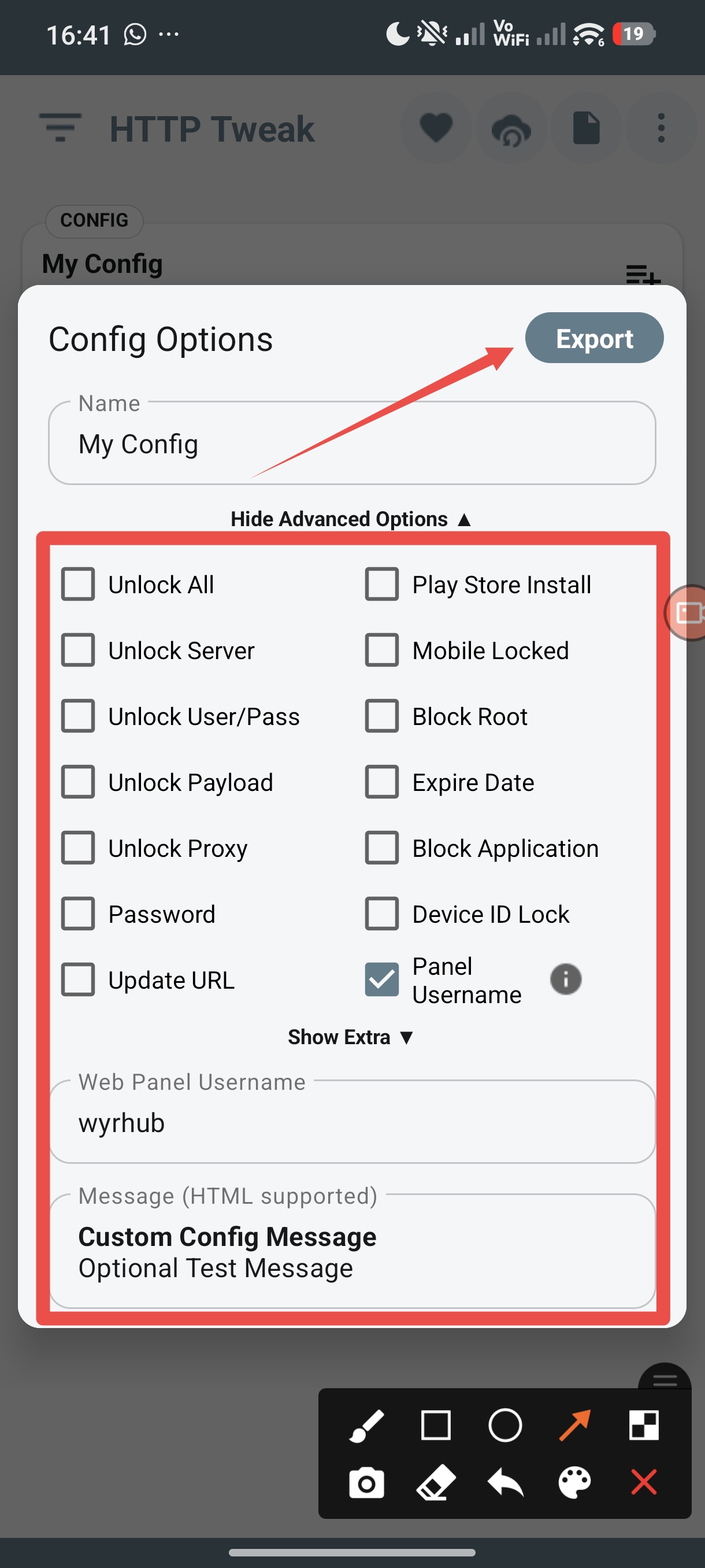
Before exporting, you can choose options such as a password, Device ID Lock, an expiry date, or other limits. Start with the options you understand and have tested. A restriction is only helpful when the intended user can still complete the setup.
Cloud Protect is different from these options: it protects the shared copy and the way the app opens it. The other options control what happens after a configuration has been opened.
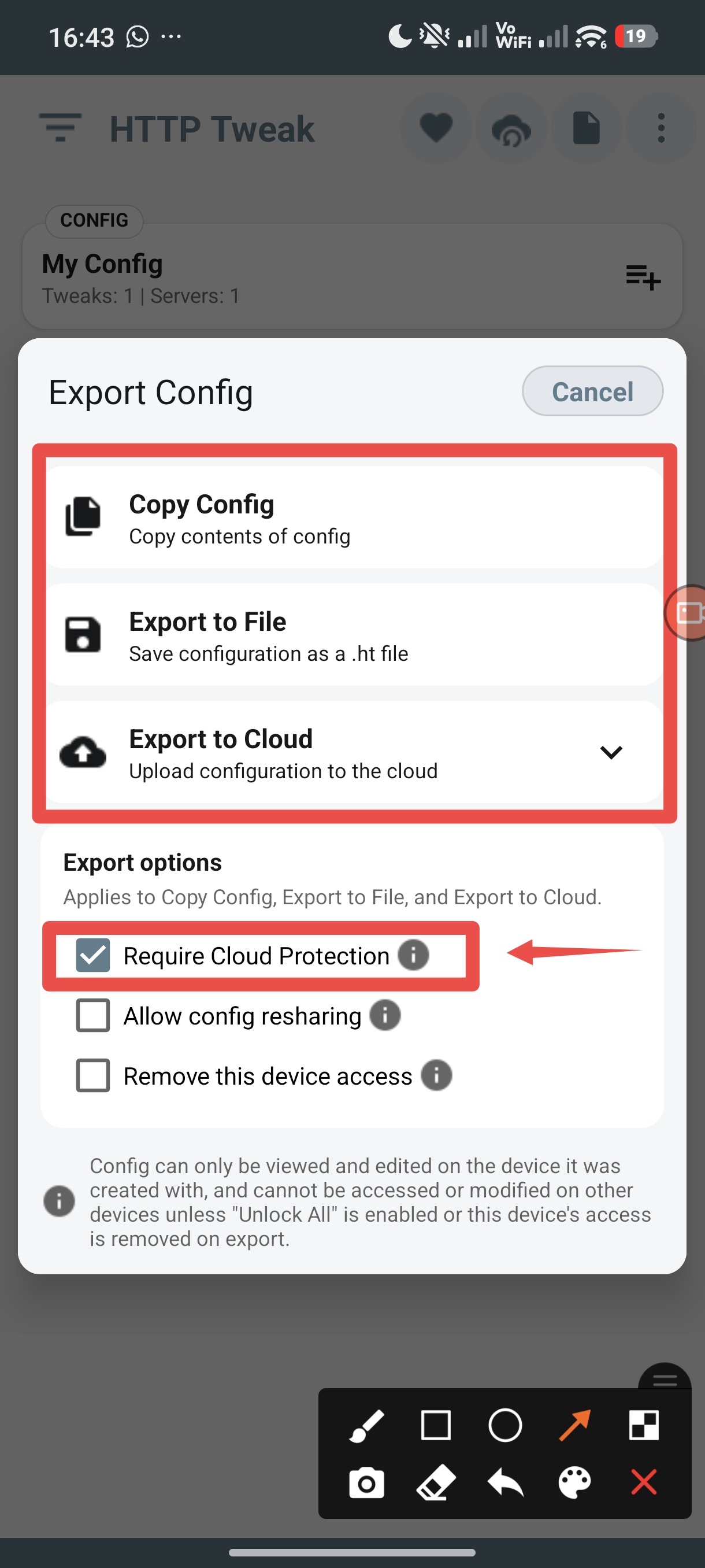
4. Turn on Require Cloud Protection
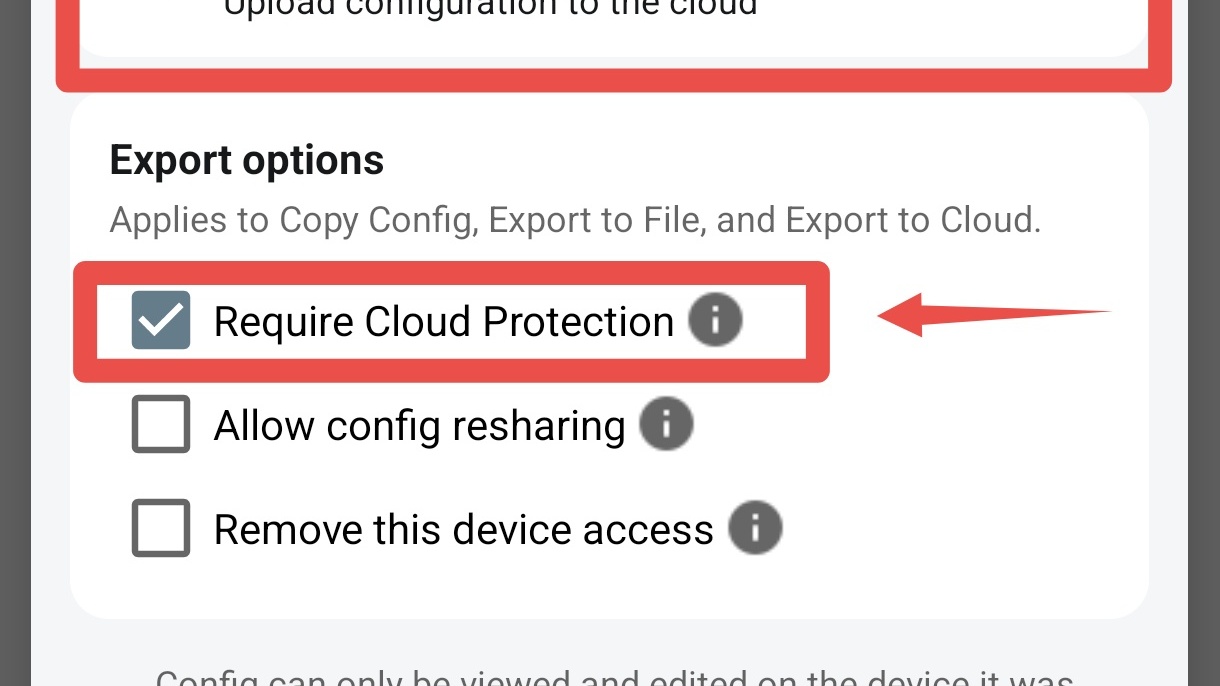
In Export Config, tick Require Cloud Protection, then choose how you want to send the configuration:
- Copy Config puts the protected copy on your clipboard.
- Export to File saves a protected configuration file.
- Export to Cloud prepares it for the cloud-sharing flow.
Only turn on Allow config resharing when you truly want recipients to pass the configuration on. Leave it off for a one-person or one-customer delivery. Use Remove this device access only when you understand that you are moving the configuration away from the current device.
After exporting, send the configuration through the private channel you intended. Do not post it publicly just because it is protected. A public post, a public link, or a screenshot can still create support and privacy problems.
When to use normal export or Cloud Protect
| Situation | Better choice | Reason |
|---|---|---|
| You are testing on your own device | Normal export | It is simple and easy to restore while you test |
| You need a backup that works without internet | Normal export, stored safely | Cloud Protect needs the cloud check when it opens |
| You are sending a configuration to a customer | Cloud Protect | It adds protection if the copy is forwarded |
| You are preparing a team or reseller package | Cloud Protect | It keeps the delivery focused on the intended app flow |
| An account or server detail has already been exposed | Change or remove that account first | Cloud Protect cannot undo information that is already known |
Good sharing habits
- Test the configuration before you send it.
- Use Cloud Protect when a copied configuration should not be freely reused.
- Give the recipient a clear instruction: open it in HTTP Tweak while connected to the internet.
- Send it through a private channel instead of posting it in a public group or public file host.
- Do not include passwords, private keys, or account details in screenshots or support messages.
- Keep your original configuration in a safe place. Do not treat an old protected export as your only long-term backup.
- If an account is exposed, change or remove the account with the provider or on your own server.
What Cloud Protect does not do
Cloud Protect does not create a VPN, SSH, proxy, or V2Ray account. It also cannot fix an expired account, a broken server, or a wrong connection setting.
It does not make a configuration impossible to copy. Its purpose is to make a copied protected export less useful on its own and to make the app check with the cloud before opening it.
Frequently asked questions
Does Cloud Protect work with copy, file, and cloud sharing?
Yes. Turn on Require Cloud Protection, then choose Copy Config, Export to File, or Export to Cloud.
Does the recipient need internet access?
Yes. The HTTP Tweak app needs an internet connection when it opens a protected configuration so it can complete the cloud check.
Can I still use a password, Device ID Lock, or expiry date?
Yes. Those options can be used alongside Cloud Protect. Test the full setup before you send it, especially when you add more than one limit.
Can I post a protected configuration publicly?
You should not. Cloud Protect is not a reason to publish configuration files, links, or private access details in a public place. Use a private delivery channel instead.
Does Cloud Protect protect my server account?
It protects the shared HTTP Tweak configuration. Your server account, subscription, and credentials still need to be protected by you or the authorized provider.
Will a protected configuration always be available forever?
Do not rely on an old protected export as your only backup. Keep the original configuration safely, and create a new protected export when a recipient needs one after a long time.